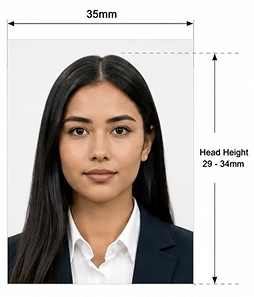
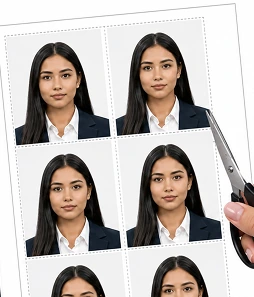
Take your photo on your phone, from home. PassportPhotosAI checks it against current HM Passport Office (HMPO) requirements, size, head position, background, lighting, and expression, and gets it ready for your application.
Free to check · $7.99 only if you download
JPG, PNG, WebP, AVIF or HEIC up to 10 MB · your photo is never stored.
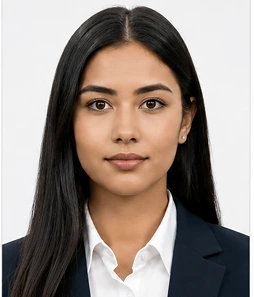
PassportPhotosAI's checks are built from HM Passport Office guidance published on GOV.UK.
For a paper passport application, you need 2 identical printed photos.
One of your printed photos may need to be countersigned, depending on your application.
If you apply for a UK passport online, you need a digital photo instead of two printed photos.
If you use a photo taken on your own phone or camera, HM Passport Office says to include your head, shoulders and upper body and not to crop the photo yourself. The passport application process handles the crop.
For digital passport photos supplied through an HMPO photo code, the technical specification requires a JPEG file between 50KB and 10MB.
For a printed 35×45mm passport photo, the image of your head from the crown to the bottom of your chin must measure between 29mm and 34mm high. This fixed millimetre head measurement applies to the printed passport photo.
For a digital photo taken on your own device, HM Passport Office instead tells you to include your full head, shoulders and upper body. Do not tightly crop the image yourself.
HMPO's own guidance for taking a digital photo recommends standing around 50cm from the background, with the person taking the photo around 1.5 metres away. This helps include enough of your head, shoulders and upper body and reduces shadows behind you.
Your UK passport photo must have a plain, light-coloured background with:
For printed passport photos, GOV.UK specifically states a plain cream or light grey background.
For digital passport photos, HMPO uses the broader requirement of a plain light-coloured background. HMPO's current photo standards say acceptable light colours can include shades of white, such as cream, ivory or vanilla, as well as light grey. HMPO's own digital-photo guidance says a light grey or cream wall works well.
The important point is not that the background must be one exact shade. It needs to be plain, light, evenly lit and provide enough contrast with your face and clothing.
For adults, your passport photo should show you:
Do not smile or frown. Your photo must also be free from red-eye.
Different rules apply to young children. Children under 6 do not need to look directly at the camera or have a plain expression, and babies under 1 do not need to have their eyes open.
HM Passport Office says not to wear glasses unless you have to. If you need to keep your glasses on:
If you can remove your glasses for the photo, HMPO recommends doing so.
Do not wear hats, fashion headwear or decorative hair accessories in your passport photo. A head covering may be worn for religious or medical reasons. If you wear an allowed head covering:
Yes. For UK passport photos, PassportPhotosAI adjusts your background to the required light grey, cream, or white to match HMPO's specification.
If your original photo has a background that needs correcting, that's reflected in your results before you download.

Upload a photo taken within the last month, against a plain, light-coloured wall. Your phone camera is fine.

The tool measures your head height and position, checks your background colour and consistency, and reviews expression, lighting, and image quality against current HMPO requirements.

See your full results and a preview before paying. If everything checks out, download a print-ready 35×45mm file for a paper application and a digital file sized correctly for GOV.UK's online system.
A printed photo must be 35mm wide by 45mm tall. A digital photo for an online application must be at least 600×750 pixels.
Not necessarily. HMPO prefers a plain light grey or cream background for better contrast, though white is also generally accepted. What matters most is that it's plain, light, and free of shadows.
It must be taken within the last month, a notably stricter window than the six months allowed in many other countries, including the US.
No. HMPO requires a neutral expression with your mouth closed, which differs from countries that allow a natural smile.
Only if medically necessary, and even then your eyes must be fully visible with no glare or reflection. Sunglasses and tinted lenses are never accepted.
Yes. PassportPhotosAI adjusts your background to the required light grey, cream or white so it matches the HMPO specification.
No. PassportPhotosAI checks your photo against the published HMPO requirements, but HM Passport Office makes the final decision. A photo that passes every check has the best chance of being approved the first time.
Get your photo checked against the current HMPO specification before you submit your application.
Check My UK Passport Photo