United Kingdom

UK Visa Photo, Ready in Minutes

Take your photo on your phone, from home. PassportPhotosAI checks it against current UKVI requirements, size, background, head position, and image quality, and gets it ready for your application.

  • UK Visa / Immigration (digital, min 600x750 px)
  • Government-verified spec
Retrieve my images

Free to check · $7.99 only if you download

JPG, PNG, WebP, AVIF or HEIC up to 10 MB · your photo is never stored.
UK Visa Photo Requirements

PassportPhotosAI's checks are built from UK Visas and Immigration guidance, as applied through the GOV.UK visa application process.

A UK visa photo isn't automatically the same as a UK passport photo. The requirements overlap heavily, but assuming the two are identical is one of the most common reasons UK visa photos get flagged at application centres. UKVI sets its own digital photo specification, separate from HM Passport Office's rules.

Digital Photo

The specifications below apply when your application asks you to provide a digital photo of your face. When UKVI asks you to upload one, it must meet these requirements:

  • Minimum dimensions: at least 600 pixels wide × 750 pixels high
  • File format: JPG or JPEG
  • File size: at least 50KB and no more than 6MB
  • Orientation: vertical or portrait
  • Colour: full colour
  • Quality: clear and in focus
  • Lighting: taken in a well-lit setting
  • Editing: no filters, retouching or other software alterations
  • Mirroring: the image must not be mirrored or flipped

The photo must show your head, shoulders and upper body. It should be a new photo of you, not a scan or photograph of another photo, your passport photo page or another identity document.

Printed Photo (When Requested)

A printed photo is not a standard requirement for every UK visa application.

For many applicants, biometric information is provided at a visa application centre or UKVCAS service point, where staff take a digital photograph of your face. Other applicants may be asked to provide a digital facial image through an online process or the UK Immigration: ID Check app.

If your application, appointment confirmation or visa application centre specifically asks you to provide a printed photograph, follow the instructions issued for your application route.

Do not assume you need to bring two 35×45mm passport photos simply because you have a biometric appointment. Your application instructions will tell you what you need to provide.

Recency

Your photo should be current and reflect your appearance now. If you're also applying for or renewing a passport around the same time, use a fresh photo for each application rather than reusing one, since the passport route specifically requires a photo taken within the last month.

Background

Your digital photo must be taken against a plain, light-coloured background. The background should:

  • have no patterns or distracting objects
  • provide clear contrast with your face and clothing
  • have no shadows behind you
  • contain no other people

UKVI's current digital-photo guidance does not require one specific shade such as cream or light grey. The important requirement is a plain, light-coloured background that provides clear contrast.

Head Size and Position

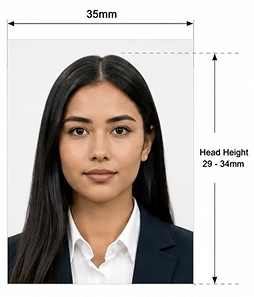
Your face should be centred, with your whole head and upper shoulders visible in the frame. Where a printed 35×45mm photo is required, the same 29–34mm head-height range used for UK passport photos applies.

Expression and Eyes

A neutral expression with your mouth closed and eyes open is required. Avoid smiling, tilting your head, or raised eyebrows.

Glasses and Head Coverings

Removing glasses is strongly recommended, since glare or reflection is a common reason photos get flagged; some visa categories treat this as a firm requirement, so check your specific application's instructions if you need to keep them on for medical reasons. Head coverings are only accepted for religious or medical reasons, and your facial features must remain fully visible.

Clothing

Wear normal, everyday clothing in solid colours. Uniforms and camouflage are not accepted, other than recognised religious attire.

Photo Quality

The photo must be clear, sharp, and in focus, with no blur, pixelation, or visible compression artefacts. A low-quality phone photo that looks fine on a small screen can still be flagged once uploaded, so check sharpness at full size before submitting.

Does PassportPhotosAI Edit My Background for a UK Visa Photo?

Yes. As with UK passport photos, background adjustment is part of the process for UK visa photos: PassportPhotosAI corrects your background to the plain, light colour UKVI's specification requires.

How PassportPhotosAI Checks Your UK Visa Photo

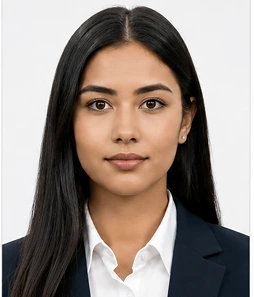
  1. A person photographed against a plain light wall, ready to upload
    1Upload Your Photo

    Take a photo on your phone against a plain, light-coloured background, with your head, shoulders, and upper body visible.

  2. A UK passport photo marked up with its 35 mm width and 29–34 mm head height
    2PassportPhotosAI Runs the Compliance Check

    The tool checks your photo's dimensions, file size, background, head position, and expression against current UKVI digital photo requirements.

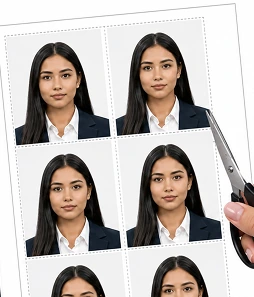
  3. A printed sheet of identical UK passport photos being cut out with scissors
    3Review, Then Download

    See your full results and a preview before paying. If everything checks out, download a digital file sized correctly for your GOV.UK visa application, plus a 35×45mm print-ready version in case your appointment requires one.

Frequently Asked Questions

What size does a UK visa photo need to be?

For the online GOV.UK application, the digital photo must be at least 600×750 pixels, in JPG or JPEG format, between 50KB and 6MB. If a printed photo is requested for a biometric appointment, it should be 35mm × 45mm.

Is a UK visa photo the same as a UK passport photo?

They're closely related but not automatically interchangeable. Both use a plain, light-coloured background and similar head positioning, but UKVI's digital specification, file-size limits, and recency expectations are set separately from HMPO's passport rules. Check the requirements for your specific application route.

What background does a UK visa photo need?

A plain, light-coloured background, light grey or cream is preferred, matching the same standard used for UK passport photos.

Can I wear glasses in a UK visa photo?

It's best to remove them if you can, since glare and reflection are common reasons photos get flagged. Some visa categories are stricter than others, so check the specific guidance for your application if you need to wear them for medical reasons.

Can PassportPhotosAI fix my background for a UK visa photo?

Yes. PassportPhotosAI corrects your background to the required plain, light colour, the same as it does for UK passport photos.

Do I need a printed photo for my visa application?

Only if your visa category requires a biometric appointment. Check your appointment confirmation or the UKVCAS instructions for your specific route.

Does passing the PassportPhotosAI check guarantee my UK visa photo will be accepted?

No. PassportPhotosAI checks your photo against the published UKVI requirements, but UK Visas and Immigration makes the final decision on your application.

Check Your Photo with PassportPhotosAI Before You Apply

Get your photo checked against the current UKVI specification before you submit your application.

Check My UK Visa Photo

Other United Kingdom documents

Other countries